Tutorial 15
🪣
Sets
9618 A-Level
A set is a data structure that allows us to store data - some key features of sets:
- Unique values - duplicate values are not allowed. If you try to add a duplicate value, it will be ignored (or overwrite the original, depending on the implementation) - you will never get two elements with the same value
- Unordered - unlike arrays, elements in a set aren't ordered (since their location is calculated based on hashing the element), meaning we can't loop through them directly (though most programming languages have a way of e.g. converting a set to an array and looping through the array). We also can't access a set element by an index, like we would an array
- Mutable - we can change the set (add or remove elements) at runtime
- Efficient for certain operations - because of the nature of hashing, certain operations are very fast - adding an element to a set, removing an element from a set and checking if an element exists within a set can all be performed in O(1) time
Hopefully we can see that the use case of a set is therefore slightly different from other data structures like an array or binary tree
In many programming languages, we can also perform common mathematical set operations such as:
- Union: Combining elements of two sets into one (no duplicates).
- Intersection: Finding common elements between two sets.
- Difference: Elements present in one set but not in the other.
- Subset/Superset: Checking if one set is a subset or superset of another.
Some operations you might want to perform are shown in this image - this is also similar to all of the (INNER/OUTER/LEFT/RIGHT etc) JOIN operations you can perform in DBMSs like MySQL
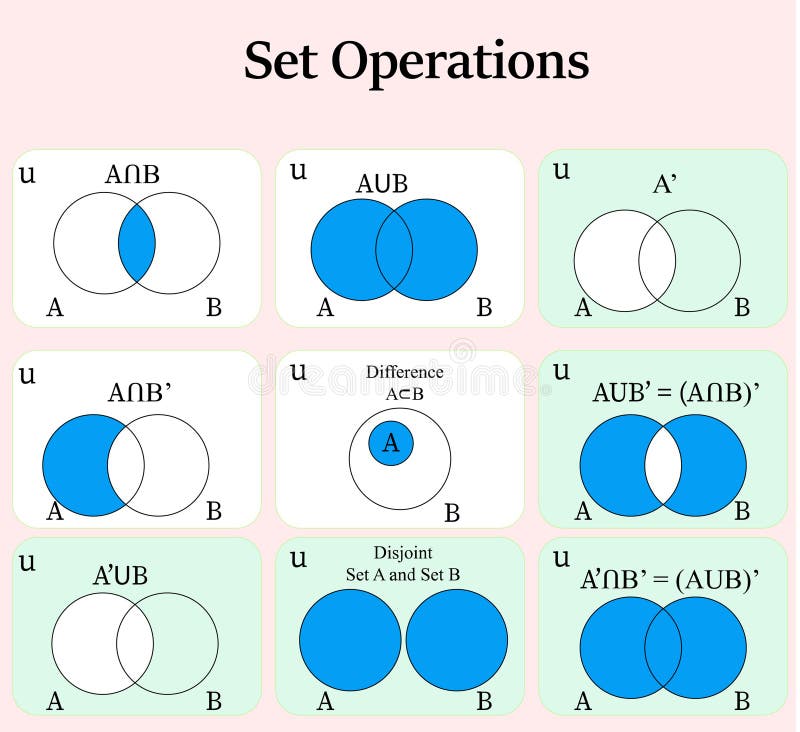
For Cambridge pseudocode, it seems they only require us to define a set for small, e.g. 3 mark questions in paper 3 in A2, rather than actually using set operations, since the official pseudocode guide doesn't actually list a way to add, remove or check if an element exists in a set at runtime. Of course, you can use sets in the real programming language in paper 4 if you want too - so far there has never been a question that's required it, but you are free to use them if it's suitable for that particular question
1
Creating a Set
As we have seen for other user-defined data types (UDTs), creating an instance of a set is a two-step process:
- first, we have to create a set type specifying the data type this set will hold
- then, we should define the elements that exist within the set
Note: Cambridge pseudocode doesn't actually specify any syntax/modules for the following features - these have been added simply so people can try using sets in a practical manner themselves, rather than just declaring them. In paper 3 exams, you should only be asked to declare a set using the syntax above, nothing else
2
Adding Elements to a Set
Additional module not on syllabus - requires site syllabus mode is set to "All Syllabuses & Extra Modules"
We have seen how to declare a set with a pre-known list of elements - but in real life, it's more common to populate sets at runtime. This might be because it's not convenient to have potentially millions of items in the source code directly or because we don't know the values we are adding to the set in advance
Here, we will just manually add 3 sports - but you can imagine in real life, it would be more common to ask the user to enter these, hence we wouldn't know the values in advance
3
Outputting a Set
Additional module not on syllabus - requires site syllabus mode is set to "All Syllabuses & Extra Modules"
While the site does provide the additional, non-syllabus ITEMS method to convert a set to an array which can then be looped over and output, simply outputting the set directly is supported, since most programming languages also allow this
4
Checking if an Element Exists in a Set
Additional module not on syllabus - requires site syllabus mode is set to "All Syllabuses & Extra Modules"
To check membership in a set, we can use the CONTAINS operator
5
Removing an Element from a Set
Additional module not on syllabus - requires site syllabus mode is set to "All Syllabuses & Extra Modules"
To remove an element from a set, we can use the REMOVE operator
6
Getting Number of Elements in a Set
Additional module not on syllabus - requires site syllabus mode is set to "All Syllabuses & Extra Modules"
To get the number of elements in a set, we can use the SIZE function
7
Converting a Set to an Array
Additional module not on syllabus - requires site syllabus mode is set to "All Syllabuses & Extra Modules"
In real programming languages, it's often useful to convert a set to an array - this might be because we want to sort the set, output in a specific format, access elements by index etc
According the syllabus and in maths, sets are unordered - as we have seen at the top of the page, since they're implemented using a hash table - i.e. when outputting or looping through, you might not get the same order as the elements were inserted. Since this site is using JavaScript sets under the hood, the elements will stay ordered, since the JavaScript specification says that sets should remain ordered (for convenience) - this is achieved by storing another data structure such as a linked list along with the set (which is implemented using a hash table). Many languages support both unordered or ordered sets, though for the exam, a set is considered unordered
As stated, we can simply use the ITEMS function to convert a set to an array
8
Unique Usernames
Create a program allowing a user to enter their username to signup - you can output a message saying "account created" if successful
If the username has already been taken, then output an error message and prompt them to re-enter
You could either create the program as an infinite loop using e.g. WHILE TRUE DO...ENDWHILE, to simulate a web server that is always listening for requests - or you could choose to allow entering an empty username to terminate the program - it's up to you
Note: in reality, you would use a database to store users and have the username either be the primary key or set a unique constraint on it - most DBMS would most likely use a binary tree to allow O(log n) searching, inserting, deleting and O(n) for ordering
9
Unique Words
Use the set theory words file at the bottom of the page to output a numbered list of each term only once - there are duplicates in the file, so you don't want to output any word more than once
10
Phonetic Alphabet Test
Create a program to read the 26 phonetic alphabet words at the bottom of the page - the user should be continuously prompted to enter a word, until they have entered all 26 words
The following 4 scenarios should have relevant output messages:
- Guessing correctly
- Guessing incorrectly
- Guessing a word they have already guessed correctly
- When all words have been guessed correctly
You could also extend this to calculate how long it took them to enter all 26 words (using the additional TIME() function), count how many incorrect guesses they had etc
11
Football Players in Both Teams
You have the following data showing some Manchester United and Chelsea football players
- Manchester United: "Cristiano Ronaldo", "Wayne Rooney", "Bruno Fernandes", "Nemanja Matic", "Juan Mata", "Marcus Rashford", "Harry Maguire", "David de Gea", "Mason Mount", "Alejandro Garnacho"
- Chelsea: "Thiago Silva", "Alejandro Garnacho", "Didier Drogba", "Nemanja Matic", "Juan Mata", "Christian Pulisic", "Cesar Azpilicueta", "Eden Hazard", "Frank Lampard", "Mason Mount"
Your goal is to find all the players that exist in both sets - i.e. that have played for both teams
You could also extend this to find players in one, but not the other (difference), combine them (union), determine if one is a subset of another etc